Repeat Jams, Repeat Bills: The Hidden Misdiagnoses Behind Chronic Printer Paper Jams
There is a particular frustration that every office manager in America has experienced at least once: the printer jams, a technician arrives, the machine runs clean for a few days, and then — without warning — the same error message reappears. The paper crumples at the same point in the feed path. The workflow stops again. Another service call is scheduled.
This cycle is not bad luck. It is, in most cases, the direct consequence of a surface-level repair that never addressed the underlying mechanical or environmental failure driving the jam in the first place. Understanding why this happens — and what questions to ask before signing another service invoice — can save your business thousands of dollars annually.
The Anatomy of a Paper Jam That Never Really Goes Away
Most technicians approach a paper jam by clearing the obstruction, running a test page, and confirming the machine feeds cleanly before closing the call. That process is not wrong, but it is incomplete when the jam is symptomatic rather than incidental.
A truly incidental jam — caused by a single sheet of damp paper or a staple accidentally fed through the tray — resolves permanently once cleared. A symptomatic jam returns because the physical condition that caused it has not changed. The distinction between these two categories is where most misdiagnoses begin.
Worn Feed Rollers: The Most Overlooked Culprit
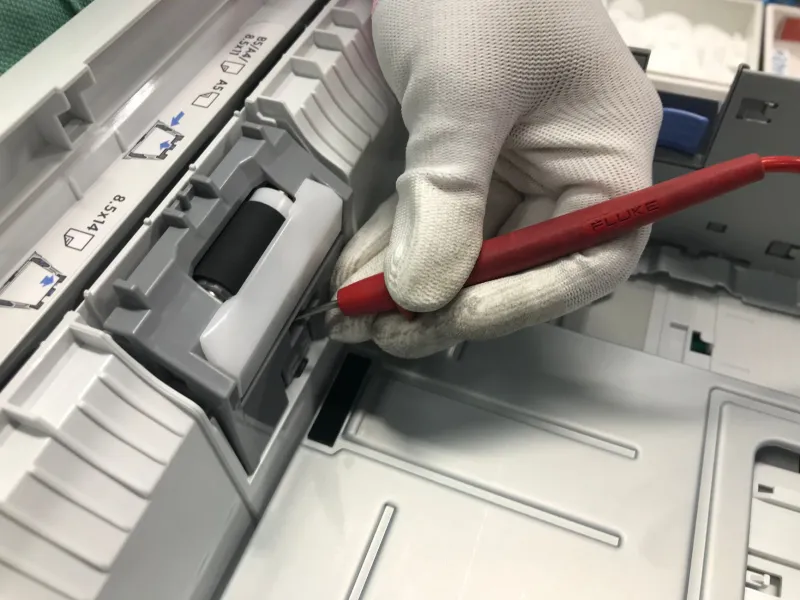
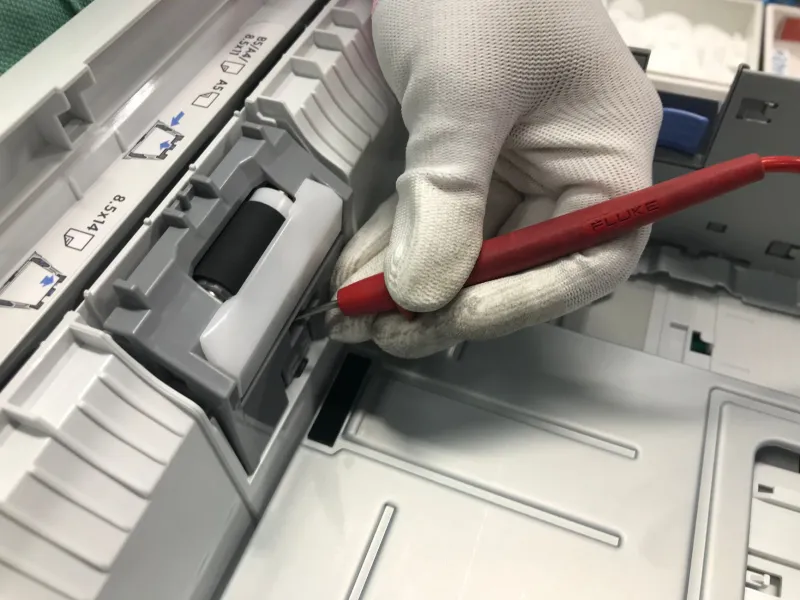
Feed rollers are rubber components that grip paper and pull it through the printer's internal path. Over time — and particularly in high-volume office environments — this rubber degrades. It hardens, glazes, or develops flat spots that reduce grip. When a roller loses adequate traction, sheets hesitate, skew, or stall mid-feed, producing a jam.
The critical problem is that a worn roller can still appear functional during a brief post-repair test. A technician running five or ten test pages may see clean feeds and declare the machine operational. But under the sustained load of a full business day — hundreds of sheets cycling through — the degraded roller reveals itself.
If your printer jams consistently after a certain number of pages, or if sheets emerge visibly skewed before jamming, worn feed rollers are the first component to investigate. Roller replacement is inexpensive. Failing to replace them when they are due, however, compounds into an expensive pattern of repeat service visits.
Humidity, Media, and the Environmental Factors Technicians Rarely Mention
Paper is hygroscopic — it absorbs and releases moisture based on the surrounding environment. In humid climates, or in office spaces where HVAC systems are inconsistent, paper stock absorbs enough ambient moisture to become subtly limp. That loss of rigidity disrupts clean sheet separation and feeding, producing jams that seem random but are actually tied to weather patterns or seasonal HVAC cycles.
Many US businesses operating in the South or along the Gulf Coast encounter this problem repeatedly without ever connecting it to their environment. A technician who does not ask about storage conditions, paper age, or the location of the paper tray relative to exterior walls is missing a significant diagnostic variable.
The fix is straightforward: store paper in sealed reams in a climate-controlled space, avoid leaving open reams in the tray overnight, and fan paper before loading it into high-humidity environments. None of these solutions require a service call — but they do require a technician who takes the time to ask the right questions.
Incorrect Media Settings: A Software Problem Disguised as a Hardware Failure
Modern printers use media configuration settings to calibrate how aggressively they feed paper based on declared paper weight and type. When those settings do not match the actual stock being used, the machine compensates incorrectly — feeding too fast, too slow, or with the wrong roller pressure — and jams result.
This is particularly common in offices that purchase paper in bulk from varying suppliers, or that occasionally run specialty media — card stock, envelopes, or heavier bond paper — without updating the printer's configuration. The machine expects standard 20 lb. copy paper and receives 32 lb. letterhead. The mismatch is invisible to the naked eye but immediately apparent to the feed mechanism.
A thorough technician will cross-reference the media settings in the printer's driver and internal configuration menu against the paper stock currently in use. Many do not. Confirming that alignment takes less than five minutes and eliminates an entire category of recurring jams.
The Diagnostic Checklist Every Office Manager Should Have Before the Technician Leaves
The most effective way to interrupt the repeat-service-call cycle is to hold the repair to a higher standard before the technician closes the ticket. The following questions are reasonable, professional, and entirely appropriate to ask:
-
What specific component caused this jam, and how was that determination made? A vague answer — "the paper path was dirty" — is not a diagnosis. A specific answer — "the secondary pickup roller showed measurable wear and has been replaced" — is.
-
Were the feed rollers inspected and measured for wear? This should be standard practice on any jam-related service call. If it was not performed, ask why.
-
Were media settings verified against the paper stock currently in use? If the technician did not check this, ask them to do so before leaving.
-
Were environmental factors discussed? If your office is in a humid region or the paper is stored in an uncontrolled space, this conversation needs to happen.
-
What is the expected service interval before this component requires attention again? A competent technician can give you a reasonable estimate based on your print volume.
What Repeat Service Calls Are Actually Costing Your Business
The direct cost of a repeat service call — typically between $150 and $400 per visit depending on your service contract and location — is the most visible expense. It is not the largest one.
The true cost includes the cumulative hours of lost productivity each time the printer goes down, the staff time spent troubleshooting, logging tickets, and waiting for technicians, and the operational disruption that cascades through departments dependent on printed documents. For a mid-sized US business running three to five office printers, chronic jam issues across a single fiscal year can represent well over $10,000 in combined direct and indirect losses.
That figure drops to near zero when the root cause is correctly identified and resolved on the first visit.
Demanding Better Repairs Is a Business Decision, Not a Technical One
The relationship between a business and its printer service provider should be one of accountability. When the same machine jams repeatedly after professional service, the appropriate response is not passive acceptance — it is a direct conversation about diagnostic methodology and repair completeness.
At Printer Service Jalandhar, our approach to recurring jam issues begins with a full mechanical inspection of the feed path, roller condition assessment, media setting verification, and an environmental consultation before any repair is closed. A printer that jams once should not jam again for the same reason. That standard is not exceptional — it is the baseline any business should expect from a qualified service provider.
If your current technician cannot explain exactly why your printer keeps jamming, that explanation gap is costing you money. Closing it starts with asking better questions.