Reading the Room: What Your Office Printer Is Trying to Tell You Before It Fails

The Problem With Waiting for an Error Code
There is a deeply ingrained habit in most American offices: the printer gets attention only when something visibly breaks. An error code flashes, a jam halts production, or a client receives a document that looks like it was printed underwater — and suddenly, the device becomes an emergency. By that point, the damage is already done.
What separates well-run operations from reactive ones is not superior equipment. It is observational discipline. Experienced facilities managers and print technicians understand that every mechanical device communicates distress long before it surrenders entirely. The challenge is learning the language.
This guide is designed to help US office managers develop exactly that skill — the ability to read a printer's behavior, output, and sound patterns as diagnostic indicators rather than background noise.
Sound: The First Vocabulary of a Struggling Printer
A healthy laser or inkjet printer operates within a predictable acoustic range. You may not consciously register it, but your brain does — which is precisely why an unfamiliar sound tends to catch your attention even when you are focused on something else.
Pay close attention to the following:
Grinding or scraping sounds during paper feed cycles often indicate worn rollers, debris caught in the paper path, or a failing gear assembly. These sounds do not resolve on their own. They worsen progressively.
Clicking at irregular intervals — particularly sounds that occur outside the normal print cycle — can signal a misaligned drum unit, a damaged fuser component, or a foreign object lodged in the mechanism.
High-pitched squealing during warm-up or active printing frequently points to a fuser assembly under stress. In laser printers, the fuser operates at high temperatures and significant mechanical pressure. When its internal components begin to wear, the friction becomes audible.
Unusual fan behavior — either a fan running constantly at high speed or one that cycles on and off erratically — may indicate thermal management problems, which can accelerate damage to sensitive internal components.
The practical recommendation is straightforward: if a printer in your office suddenly sounds different, document the change and escalate it to your service provider. Do not wait for the sound to disappear on its own.
Output Texture and Visual Quality: What the Page Reveals
The printed page is arguably the most accessible diagnostic tool available to a non-technical observer. You do not need specialized equipment to notice that something is wrong — you need only to look carefully and consistently.
Faded or uneven toner distribution across a page, particularly when the cartridge is not depleted, often suggests a failing drum unit or a developing roller that is no longer applying toner uniformly. In customer-facing businesses — legal offices, marketing agencies, medical practices — this kind of output quality degradation carries real reputational risk.
Horizontal or vertical streaks running through printed content are among the most common early indicators of drum damage or a contaminated fuser. A single streak may seem cosmetic. A pattern of recurring streaks signals internal wear that will compound.
Ghosting — the faint repetition of a previously printed image appearing elsewhere on the page — is a classic symptom of a drum that has lost its ability to fully discharge between print cycles. This is a component-level issue that will not self-correct.
Smearing or smudging on laser-printed documents, particularly when the ink comes off when touched, points directly to fuser failure. The fuser's job is to bond toner to paper through heat and pressure. When it can no longer do so effectively, the output becomes unreliable and unprofessional.
Color inconsistency in color laser or inkjet printers — where a document printed on Monday looks noticeably different from the same document printed on Thursday — often reflects calibration drift, a clogged printhead, or uneven ink delivery. For businesses where brand color accuracy matters, this is not a cosmetic issue. It is a brand integrity issue.
Paper Handling Behavior: The Mechanical Narrative
How a printer manages paper through its feed path tells a detailed story about the condition of its internal mechanical components.
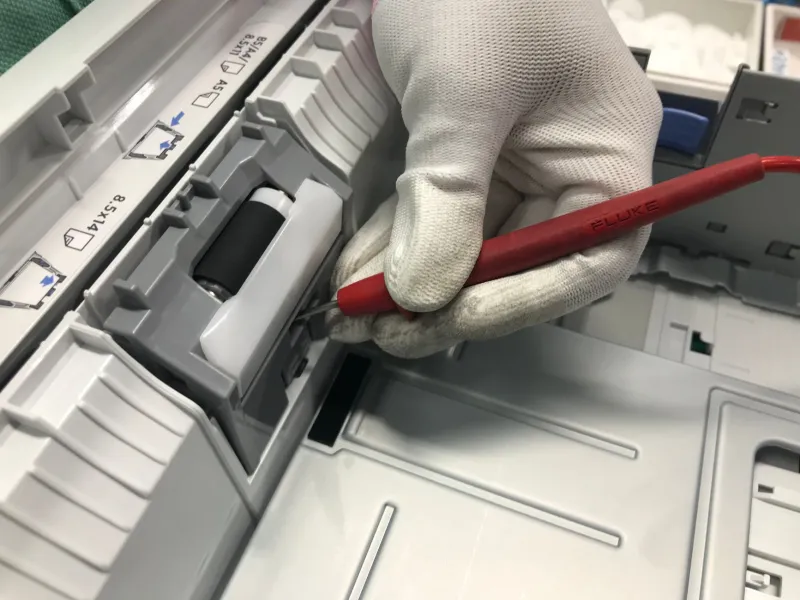
Frequent misfeeds from a specific tray — where paper fails to load properly on a recurring basis — typically indicate worn pickup rollers. These components are inexpensive to replace when caught early. Left unaddressed, they can cause paper path damage that extends the repair significantly.
Skewed output, where pages consistently emerge at a slight angle, suggests that the registration rollers responsible for aligning the sheet are no longer applying even pressure. This is a precision-sensitive function, and deviation is a measurable early warning.
Double-feeding, where two sheets enter the paper path simultaneously, points to worn separation pads — the components designed to isolate individual sheets during pickup. Like roller wear, this is an inexpensive fix in its early stages.
Inconsistent paper weight handling, where a printer that previously managed cardstock or heavier paper stock without issue now struggles, reflects declining mechanical grip strength across the feed assembly.
Office managers who track these behaviors across time — even informally, through simple notes or a shared log — build a documented baseline that makes it far easier to identify when normal variation crosses into genuine decline.
Building Observational Habits Into Daily Operations
The single most effective intervention available to a US office manager is not a more expensive printer or a more comprehensive service contract. It is a structured habit of attentive observation.
Consider implementing the following practices:
-
Designate a print quality checkpoint. Assign one person per shift or per day to review a sample of printed output against a reference standard. This does not need to be elaborate — a quick visual inspection takes less than two minutes.
-
Maintain an informal device log. A shared document or even a physical notepad near the printer where staff can note unusual sounds, output anomalies, or feed problems creates a running record that is invaluable when engaging a service technician.
-
Establish a threshold for escalation. Define clearly what constitutes a reportable issue — for example, any recurring streak pattern, any grinding sound lasting more than one print cycle, or any paper jam occurring more than twice in a single day. Ambiguity leads to inaction.
-
Schedule periodic walk-throughs. A brief monthly review of all print devices in the office, conducted with the specific intent of listening and observing rather than using the equipment, can surface emerging problems before they reach the critical stage.
Why Early Detection Is a Competitive Advantage
For businesses that interact directly with clients — whether through printed proposals, invoices, branding materials, or patient records — the quality of every printed document is a reflection of organizational competence. A smeared contract or a color-shifted brochure does not just represent a printer problem. It represents a business that did not catch the problem in time.
Proactive observation changes that dynamic entirely. When office managers treat their printers as mechanical systems with readable behavioral patterns rather than appliances that either work or do not, they gain the ability to intervene during the early, less expensive stages of component wear.
At Printer Service Jalandhar, we work with businesses across a wide range of industries who have discovered that the most cost-effective maintenance strategy is not reactive — it is observational. The warning signs are almost always present. The question is whether anyone in the office is paying attention to them.
Developing that attention is not a technical skill. It is an operational discipline. And for customer-facing businesses operating in competitive US markets, it may be one of the most straightforward competitive advantages available.