The Number on the Box Is Not the Number That Matters: Rethinking Monthly Duty Cycle Ratings Before Your Next Printer Purchase
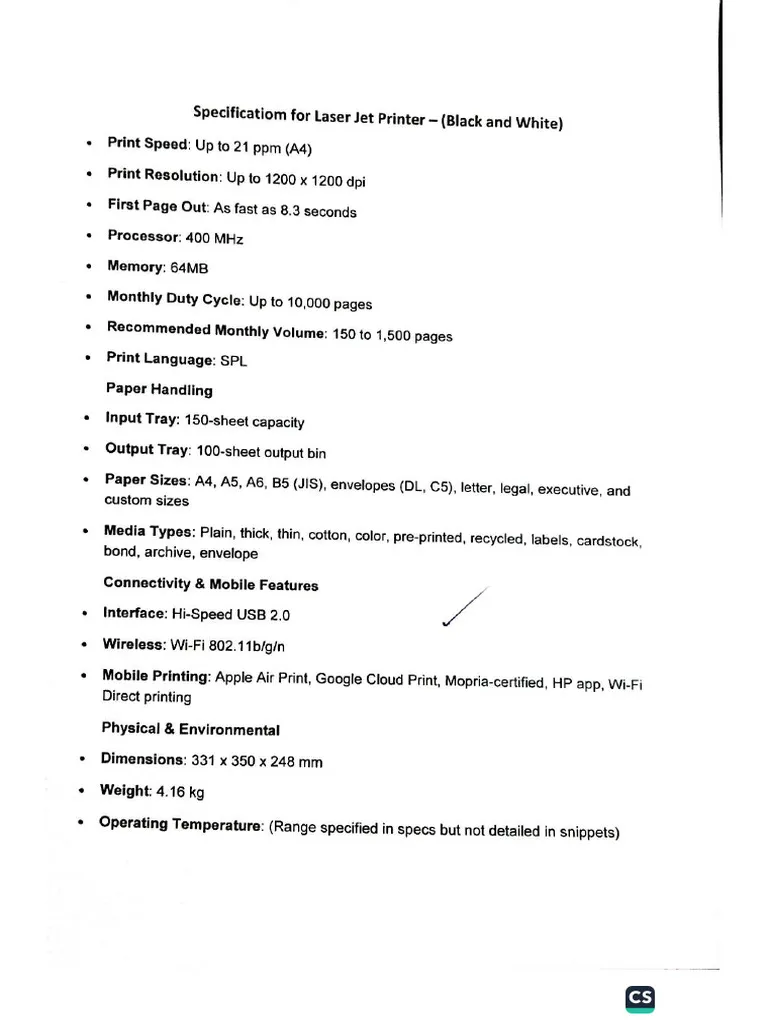
Photo: laser printer specification label warehouse office equipment, via imgv2-1-f.scribdassets.com
Somewhere in a product warehouse right now sits a $300 laser printer with a duty cycle of 50,000 pages per month printed on its spec sheet. A small business owner will read that number, conclude the machine can anchor a growing office, and buy it. Within eighteen months, the paper feed will start failing, the fuser will wear through, and the owner will assume they bought a lemon.
They didn't. They read the number correctly and the number misled them anyway.
What the Duty Cycle Rating Actually Measures
The monthly duty cycle is a durability stress figure — the mechanical ceiling the manufacturer certifies the device can survive in a laboratory setting, not a recommendation for sustained operation. It answers the question 'could this machine print 50,000 pages in a month?' It says nothing about what happens if you try it repeatedly, month after month.
The widely used rule of thumb among service technicians is that a printer should operate at no more than 10 to 20% of its rated duty cycle for long-term reliability. That 50,000-page workhorse? Sustained duty above 7,500 pages a month is already pushing the mechanism. Run it at 20,000 and you should not be surprised when consumables costs climb and component failures arrive years ahead of schedule.
Why the Gap Between Rating and Reality Exists
Duty cycle ratings serve a competitive purpose. When two printers sit side by side on a retail shelf, the one advertising a higher number wins the comparison, regardless of whether either buyer will ever approach it. Meanwhile, the components that actually wear — feed rollers, fuser film, pickup assemblies, drum units — degrade on a schedule tied to real usage, not to the theoretical maximum.
The result is a systematic sizing error. Businesses buy underbuilt machines based on inflated numbers, run them hard, and then blame the machine when it fails. The machine did exactly what its rating promised. The rating just wasn't the promise the buyer thought it was.
How to Size a Printer to Your Actual Volume
Start with measured data, not estimates. Pull the total page count from the device's counter or print-management software over the past three months and divide by three. Then apply a growth buffer of 25 to 50% if the business is expanding. That figure — not the spec sheet — is your real monthly volume.
Now invert the 20% rule: for sustained volume of 5,000 pages per month, look for a rated duty cycle of at least 25,000, which generally means a business-class mid-range model rather than a retail unit. Expect to pay more up front. The mid-range workhorses — the models offices rarely brag about — routinely outlast three generations of cheaper hardware and cost less per year of service.
Questions Worth Asking Before You Sign the Purchase Order
Ask what the recommended monthly volume is, not the maximum — reputable manufacturers publish both, and the gap between them tells you everything. Ask about the rated life of the fuser and drum in pages, since those are the components that will dictate your repair schedule. Ask whether the model uses a separate drum and toner, which typically lowers long-term consumables cost. And ask what a service call costs out of warranty, because that number, not the sticker price, determines the true cost of owning the wrong machine.
The duty cycle rating is not a lie, exactly. It is a laboratory figure wearing the costume of a purchasing recommendation. Businesses that learn to read past it buy better machines, replace them less often, and spend markedly less on service calls — which is, in the end, the entire point of reading the specifications carefully in the first place.